Step-by-step video guides & platform walkthroughs
Master your restaurant setup with short, actionable tutorials. From contactless QR table ordering to fast counter checkout and thermal kitchen printing.
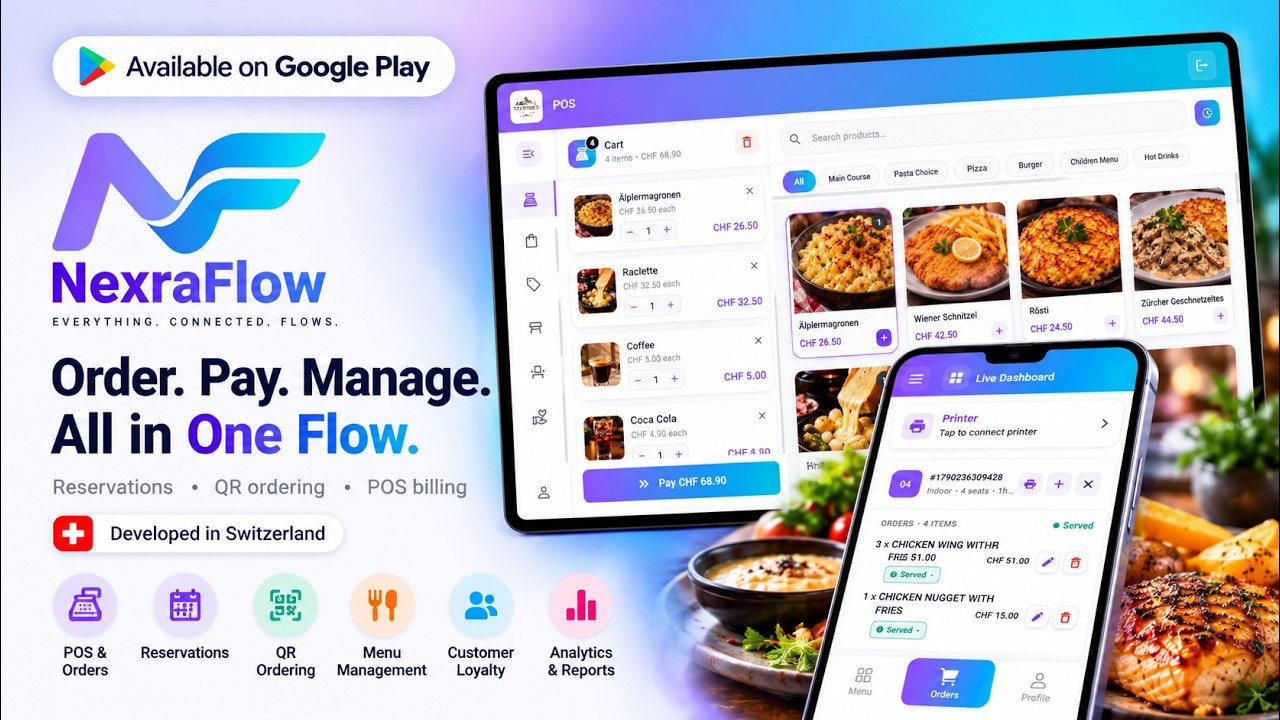
NexraFlow Restaurant – All-in-One Restaurant Management & POS
The complete platform overview: table-side QR ordering, instant kitchen push notifications, wireless ESC/POS thermal printing, and live cloud POS running on any device.
0ms Kitchen Alert
Instant Sound & Push
ESC/POS Printing
Wireless Thermal Route
Table QR Ordering
0% Dine-In Commission
Cloud Floor Plan
Live Seating & POS
All 14 Official Video Guides
Select any guide below to watch it in the player above or on YouTube.
NexraFlow Restaurant – All-in-One Restaurant Management & POS
The complete platform overview: table-side QR ordering, instant kitchen push notifications, wireless ESC/POS thermal printing, and live cloud POS running on any device.
Getting Started Guide: Sign-Up & First Restaurant Setup
A step-by-step walkthrough of creating your NexraFlow account, adding restaurant details, and setting up initial tables.
QR Table Ordering Guide: Setup for Owners & Guests
How guests scan contactless QR codes to order with 0% commission, and how tickets route to the kitchen instantly.
Online Orders: From New Order to Delivered
Manage delivery, takeaway, and counter pickups from incoming order ping to live kitchen prep and dispatch.
NexraFlow Online Orders: Settings & Controls Guide for Restaurant Owners
Learn how to customize and control your online ordering system in NexraFlow: prep lead times, pickup windows, order acceptance modes, and kitchen printing.
Reservation Guide: Managing, Editing & Tracking Reservations
Manage dining floor seating, 2-hour dining windows, guest notes, and automated SMS confirmation.
NexraFlow iFrame Integration: Embed Table Reservations on Your Website
Learn how to embed the NexraFlow table booking system directly into your own restaurant website using an iFrame for seamless guest reservations.
POS Guide: Ring Up a Sale at the Counter (Quick Checkout)
Take walk-in counter sales, split table checks, and settle orders with cash, cards, and Swiss TWINT.
Products Guide: Add, Edit & Manage Menu Dishes & Products
Create menu categories, portion options, modifiers, VAT tax rates, and dietary tags in seconds.
Loyalty & Offers Guide: Discounts, Stamp Cards & ID Checks
Reward repeat diners with digital loyalty stamp cards, senior/student card verification, and custom promotions.
NexraFlow Money Settings Guide: Currency, Taxes, Payments & Your Plan
Learn how to configure your financial and payment settings in NexraFlow: currency setup, tax percentages, payment methods, and subscription plan management.

Analytics Guide: Reading Your Restaurant Dashboard & Numbers
Track daily net sales, average order value, top-performing menu items, and peak dining hours in real-time.
Staff & Security: Team Logins & Table PIN Setup Guide
Configure granular role permissions for servers, managers, and kitchen staff with secure staff PIN codes.
Test the live demo or start your 14-day free trial
Experience simulated online food ordering, table reservations, and 0ms kitchen alerts with zero commitment.